
All-in-one AI studio for faceless creators

Make faceless videos with AI.
From script to screen, in one studio.

Centabatch is the all-in-one AI studio for faceless content creators. Write the script, then generate the voiceover, images, video, and music — download the whole pack, assemble the final video in your editor, and publish to your social platforms. Built by a creator who makes a living from faceless content.

Free during beta · No card required

0
Modules in the studio
0
Lower cost via Batch
0
Output formats
0
Assets per batch job
The problem

A dozen disconnected tools

Producing AI video today means stitching together separate apps — one for scripts, another for images, another for upscaling, another for video, more for music and voice — each with its own files, formats, and costs. It's slow, manual, and rarely scales past one asset at a time.

The solution

One batch-first workspace

Centabatch unifies the whole pipeline into one app with a shared workspace. Generate hundreds of assets in a few clicks, review them, and download everything as a single ZIP. Generation runs as efficient batch jobs — about 50% cheaper, fire-and-forget: place a large order, walk away, come back to finished assets.

Three ways to start

Start anywhere — use only the tools you need.

Start with the bot

Upload your style file and a video topic, and let the Content Engine build the script, prompts, thumbnails, and more.

Start with your prompts

Paste or upload a prompt list — typed, or a txt / docx / pdf — and generate a full batch.

Start with your images

Upload your own images and animate them into cinematic video clips.

The suite

Your complete faceless-content studio

Ten modules covering every step — from idea to a finished, publish-ready video.

Content Engine

Your AI showrunner — turns a topic into a full script, voiceover text, image prompts, thumbnails, and SEO.

Voice Over

Turn your script into natural, studio-quality narration — no mic, no recording, no voice actor.

Image Generator

Batch-generate hundreds of on-brand scenes in a single run.

Image Upscaler

Decode and sharpen frames with optional 4× upscaling, staged for animation.

Video Generator

Bring your scenes to life as cinematic video — single-shot or multi-shot.

Music Generator

Score your video with original, royalty-free AI music made to fit the mood.

JSONL Creator

Turn prompts or documents into clean, ready-to-run batch request files.

File Explorer

Your workspace — preview, edit, rename, and download the full pack as a ZIP.

Usage & Stats

Track cost and output across every job in one dashboard.

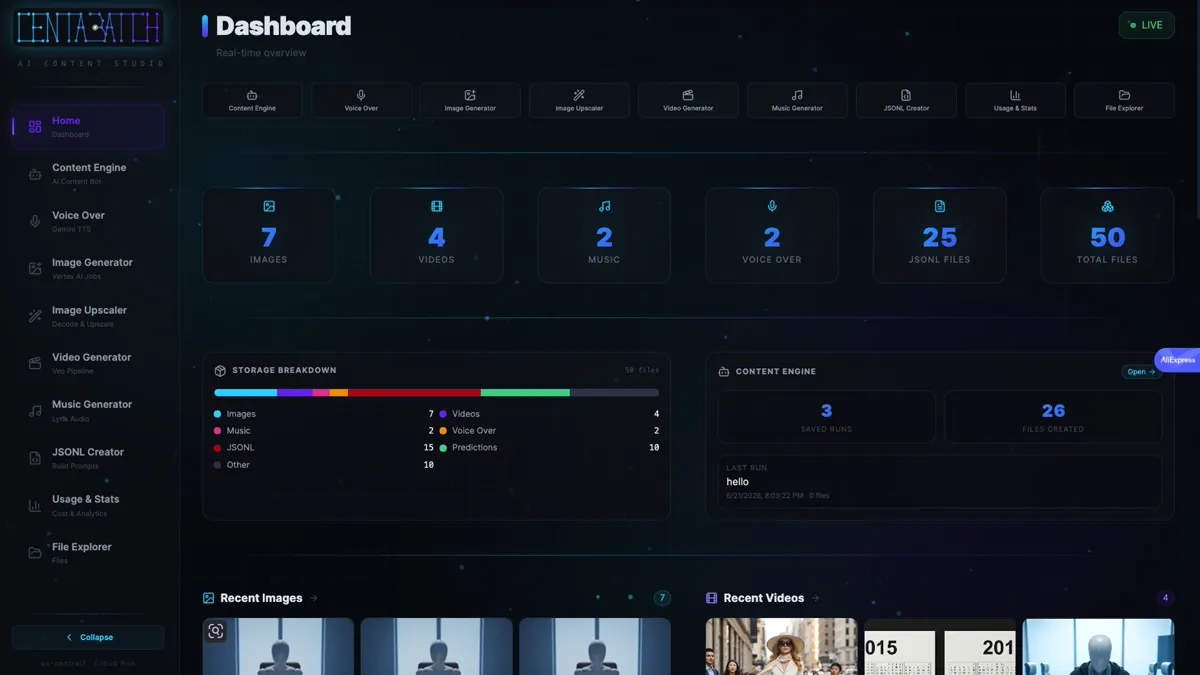
Dashboard

A live overview of your whole production pipeline.

See it in action

A real, working product

Live screens from the real, working Centabatch app. (scroll →)

Centabatch Dashboard
Dashboard — a live overview of your whole production pipeline.
Centabatch Content Engine
Content Engine — your AI showrunner: script, voiceover text, prompts, thumbnails, and SEO.
Centabatch Voice Over
Voice Over — studio-quality AI narration straight from your script.
Centabatch Image Generator
Image Generator — batch-generate hundreds of on-brand scenes in one run.
Centabatch Image Upscaler
Image Upscaler — decode and sharpen frames, with optional 4× upscaling.
Centabatch Video Generator
Video Generator — bring your scenes to life as cinematic video.
Centabatch Music Generator
Music Generator — score your video with original, royalty-free AI music.
Centabatch JSONL Creator — images
JSONL Creator — build image-generation batch files.
Centabatch JSONL Creator — video
JSONL Creator — build video request files.
Centabatch Usage & Stats
Usage & Stats — track cost and output across every job.
Centabatch File Explorer — video
File Explorer — preview and download your generated video clips.
Centabatch File Explorer — images
File Explorer — preview and download your generated images.
Centabatch File Explorer — JSONL
File Explorer — manage your batch request (JSONL) files.
The pipeline

From idea to edit-ready assets

1
Content Engine builds the plan

Script, voiceover text, image prompts, thumbnails, and SEO.

2
Generate the voiceover & music

Turn the script into narration, and score it with an original soundtrack.

3
Generate & sharpen the visuals

Image Generator creates the scenes; Image Upscaler sharpens them.

4
Animate your scenes

Bring every scene to life as cinematic video clips.

5
Download the whole pack

Grab every asset — voice, music, images, and clips — from the File Explorer as one ZIP.

6
Assemble, edit & publish

Drop everything into your video editor of choice, cut the final video, and publish it anywhere.

Why Centabatch is different

Modular

Start with the bot, prompts, or images — use only what you need.

Fire-and-forget batch

Place a large order, walk away, and come back to finished assets.

~50% lower cost

Generation runs as efficient batch jobs you can fire and forget.

Multi-format

16:9, 1:1, and 9:16 — landscape, square, and vertical for any platform.

Built for volume

Hundreds of assets in a few clicks, one-ZIP download.

Consistent

Reference images keep a brand look or recurring character on-model.

Why we built it

Built by a creator, for creators

Centabatch started as the toolkit I built for my own faceless content channels. Producing videos at scale meant juggling a dozen different AI tools — one for scripts, another for voice, more for images, video, and music — each with its own files, costs, and busywork. So I put the entire workflow into a single studio. Today it's how I turn an idea into a finished, monetizable video — and now we're opening it up to every creator who wants to do the same.

Faceless video Make money with AI One studio, end to end Early-stage, in active development

One tool, many workflows

A few of the ways creators use Centabatch.

01

Full guided creation, end to end with the bot.

02

Bring your own prompts — skip the bot entirely.

03

Bring your own images and animate them.

04

Reference-guided generation for brand consistency.

05

A single asset, or a batch of hundreds.

06

Standalone upscaling of existing renders.

07

Cinematic multi-shot video — clips can include sound effects.

08

Turn a script document into a prompt batch.

09

Multi-format output — landscape, square, and vertical (16:9, 1:1, 9:16).

10

A full pack: idea, script, VO, images, video, SFX, music, thumbnails, and metadata.

Free during beta

Join the waitlist

Be first to create at scale with Centabatch. No card required.

About Centabatch

Centabatch was built by a content creator, for content creators — out of a real need to produce on-brand video at scale without paying for a dozen separate tools. It's an early-stage product in active development, shipped as a real, working app you can use today.

Get in touch

Questions, feedback, or early-access requests:

hello@centabatch.com